Ctrl+Shift+Jfrom any app on Windows
Press. Type. Forget.
One key opens a box over whatever you are doing. Type the thought, press Ctrl+Enter, and you are back - the note is on your disk and the reminder is already set.
Free. Windows 10 and 11.
100ms
Budget from keypress to a visible, typeable overlay.
Design budget. Not yet measured on Windows.
0 accounts
No sign-in, no email wall, no server to be down.
1 file
Every capture in one SQLite file you can copy anywhere.
The thought you have at 11:04, in a call you cannot leave.
You are four people into a Teams call and someone mentions the vendor contract. You need to call them tomorrow at two. Opening To Do means leaving the call, finding the window, picking a list, typing, setting a date, and coming back having missed a minute.
So you don't. You tell yourself you will remember, and you don't. The cost is never the note you lost; it is the twenty minutes at 4pm spent trying to reconstruct what the thought was.
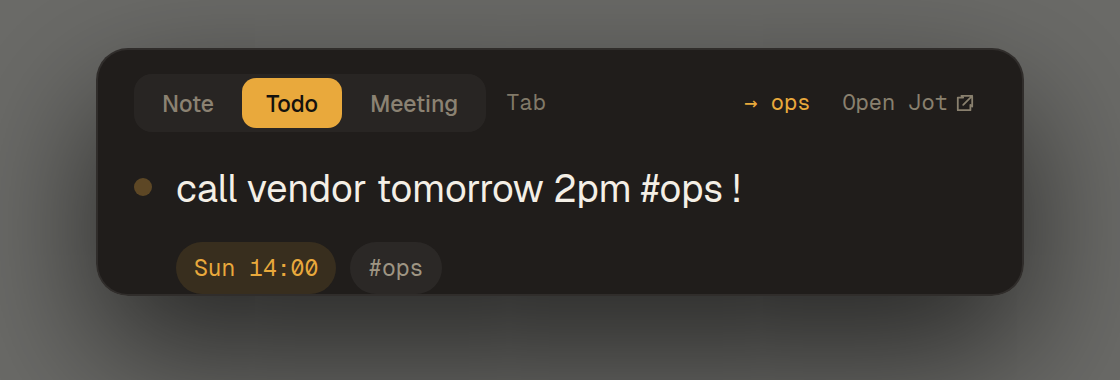
With Jot you press one key. The box is there before you have finished thinking. You type it, press Ctrl+Enter, and you are back in the call - the overlay gone, focus where it was, nobody on the call any wiser. Tomorrow at two, Jot reminds you.
Four seconds, start to finish.
There is no window to arrange, no list to pick and nothing to file. The only decision you make is what to type.
01
Press, from inside anythingCtrl+Shift+J
A global shortcut, so it works from a Teams call, a spreadsheet, a game, a remote desktop. The overlay is built when Windows starts and then only ever shown, because building a window costs more milliseconds than the whole budget allows.
02
Type it the way you would say itTab
"Call the vendor tomorrow 2pm #work !" is a todo, due at two, tagged work, flagged. The date, the tag and the flag are read out of the line as you type it. Tab switches between a note and a todo.
03
Save, and you are already goneCtrl+Enter
Jot saves the thought to disk, then the overlay hides, focus returns to your previous window, and a small confirmation appears without stealing a keystroke.
04
It comes back when it is useful
A due time becomes a Jot popup or Windows notification, whichever you choose in Settings. Jot catches up when it next starts if a reminder came due while it was closed.
The line is the interface.
Four tokens, read out of the sentence as you type it. Nothing else to learn, and no form to fill in afterwards.
tomorrow 2pmSets the due time, and the reminder with it.
Call the vendor tomorrow 2pm
#tagTags the capture. The first tag also picks the folder or list.
Renew the domain #admin
>listFiles it into a named list, overriding the tag.
Book the flights >Travel
!Marks it important. Needs whitespace around it, so "call now!" is safe.
Reply to the auditor !
Your day, on one screen.
Jot opens on Today: what is late, what is due, and what you captured. Move a late todo to tomorrow in one click, tick one off, or make a note a todo. From the capture box, Ctrl+↓ shows the same list without leaving it, and a line you already wrote down is flagged before you write it twice.
Minutes, typed as the meeting happens.
Press the same key in a meeting and Tab to Meeting. Type what you hear, one line at a time. Jot sorts each line as you press Enter, so the minutes are already organised when the meeting ends.
@John send the deck friAn action for John, due Friday.
Raj will book the roomAn action for Raj, once Raj is a name Jot knows.
I'll call the vendorYour action, and a todo in your list.
decided vendor BA decision.
topic: BudgetA heading for the notes that follow.
? who owns the migrationAn open question.
- Actions are grouped by person across the whole meeting, each with a checkbox you can tick later - in the minutes or in your todos.
- A small pill stays on screen while the meeting runs, and neither it nor the capture box shows up when you share your screen.
- When it ends: copy the minutes and paste them into a Reply All on the invite, or - if you turn it on - let Jot open that reply in classic Outlook for you.
Not a note app.
Jot is the thirty seconds between having a thought and losing it. What happens afterwards is yours to decide.
What it is
- A box that opens over anything, in one key
- A local SQLite file with everything you ever typed into it
- A Today screen, plus views for notes, todos and what is coming up
- Meeting minutes you type a line at a time, sorted as you go
What it will never be
- A document editor, or a place to write anything long
- A wiki, a graph, a second brain or a knowledge base
- A transcription or meeting-recording tool
- Somewhere your notes live behind somebody else's login
Every key.
The whole product, on one sheet. Nothing here needs a mouse, and the first row is rebindable if Windows or another app already owns it.
Anywhere in Windows
- Ctrl+Shift+J
- Open the capture overlay
- Esc
- Close it, keeping the draft for a day
In the overlay
- Enter
- Save this one and keep the box open
- Ctrl+Enter
- Save and close
- Shift+Enter
- New line
- Tab
- Switch between note and todo
- Ctrl+↓
- Peek at today's todos and your last capture
In a meeting
- Tab
- Cycle to the Meeting tab
- Enter
- Save the line, sorted into its section
- Ctrl+Enter
- Save and close - the meeting keeps running
- Ctrl+Shift+Enter
- End the meeting and send the minutes
In the app window
- Ctrl+K
- Search everything ever captured
- /
- Change a note block's type
- Esc
- Close the window
No account to create.
Jot opens, captures and reminds without asking for an email address or a password.
If you choose to use AI, the capture goes directly to the provider whose keyyou supplied. Jot has no AI service of its own.
The privacy policy, which is short, and how the secrets are stored, which is the part that matters.
Price.
Free
€0
The whole capture layer. No account, no limits, no expiry, no upsell in the overlay.
- Unlimited captures, notes and todos
- Global hotkey, rebindable, pausable
- Everything in one local SQLite file
- Dates, tags and lists parsed as you type
- A Today screen: what's overdue, due, and captured today
- Recall and tick today's todos from the capture box
- Custom or Windows reminders, with a sound setting
- Full-text search across everything you've captured
- AI cleanup and splitting, with your own API key
- Daily local backups, kept for a week
- Markdown folder export
- Quick-add templates for notes and todos
- An optional daily review of open todos
- Encrypted collaborative copies that expire after 7 days
- Meeting minutes with tracked actions
The capture layer has no trial, no expiry and no upsell in the overlay.
Reasonable questions.
- Do I need an account?
- No. Capture, parsing, reminders, search and the inbox never ask who you are.
- Where exactly do my captures live?
- In a SQLite database in one folder on your machine, plus a rotating daily copy of it kept for seven days. You can also export every current note and todo as ordinary Markdown files whenever you want. The direct download uses your Windows app-data folder, and the Microsoft Store version uses the app's own storage, which Windows removes when you uninstall. The support page explains where to find and back up that folder.
- Does it work offline?
- Yes. Capture, search and reminders do not depend on a connection. Creating or editing an optional seven-day Live Jot needs one.
- What is a Live Jot?
- An optional encrypted web copy you can edit with someone else for seven days. The encryption key stays in the link, the service stores only ciphertext, and you can stop sharing early. Web edits stay in that temporary copy rather than changing your original local Jot.
- Is the AI reading my notes?
- Only when you press the button, and only to the provider whose key you typed in. Jot has no AI service of its own and no key of its own. Nothing is filed, rewritten or sent anywhere automatically - every suggestion is shown to you and applied only if you accept it.
- Does Jot record or transcribe my meetings?
- No, and it never will. The Meeting tab is for the notes you type yourself, one line at a time. Jot sorts each line into a decision, an action for a named person, or a note, and gives you minutes you can paste into a reply. There is no microphone, no recording and no transcript.
- Will my meeting notes show up when I share my screen?
- Not by default. The capture box and the meeting pill are hidden from screen sharing and screenshots while staying visible to you. You can turn that off in Settings.
- Does it read my Outlook calendar?
- Only if you turn on Reply in Outlook, which is off until you say yes. Then, when a meeting ends, Jot asks classic Outlook on your own PC which calendar meeting was on and opens a reply to its attendees with the minutes in it. Nothing is sent until you press Send, and nothing goes through us. Copy minutes works without it, in any mail app.
- Why is it Windows only?
- Because the parts that matter are Windows parts: the global hotkey, reading which window had focus before ours took it, handing that focus back, keeping the overlay out of Alt-Tab, and encrypting stored secrets with DPAPI. A port is not a build target, it is a rewrite of the interesting half.
- How is this different from the Windows sticky-note or clipboard tools?
- Those give you a surface to write on and leave you to deal with it later. Jot's whole design goal is that you never deal with it: the capture is parsed into a due date and a destination as you type it, then stays ready when you need it.
- Can I see the source?
- Yes. The repository is public, including the roadmap, the design decisions and the written-but-never-run-on-Windows list. Jot is not open source in the licence sense; it is open in the sense that you can read what it does before you install it.
Work with fewer interruptions.
Practical guides to quick capture, Microsoft To Do and keeping a thought without losing the work already in front of you.